Working with the other apps
A file is rarely wanted in Drive for its own sake. It is wanted on a message, on an appointment, on the start page — or it arrived as an attachment somewhere else and now needs keeping. These are the places where Drive meets Mail, Calendar, Tasks, the Address Book and the Portal, in both directions, and all of them exist to spare the user the same detour: download to the local disk, then upload again.
Attach a Drive file to a mail or a PIM item
Summary A file that is already in Drive can be put on an email, an appointment, a contact or a task without being fetched first. Add from Drive opens a picker on the whole folder tree, Favorites and Recent files included, and the file goes onto the message or the item from there.
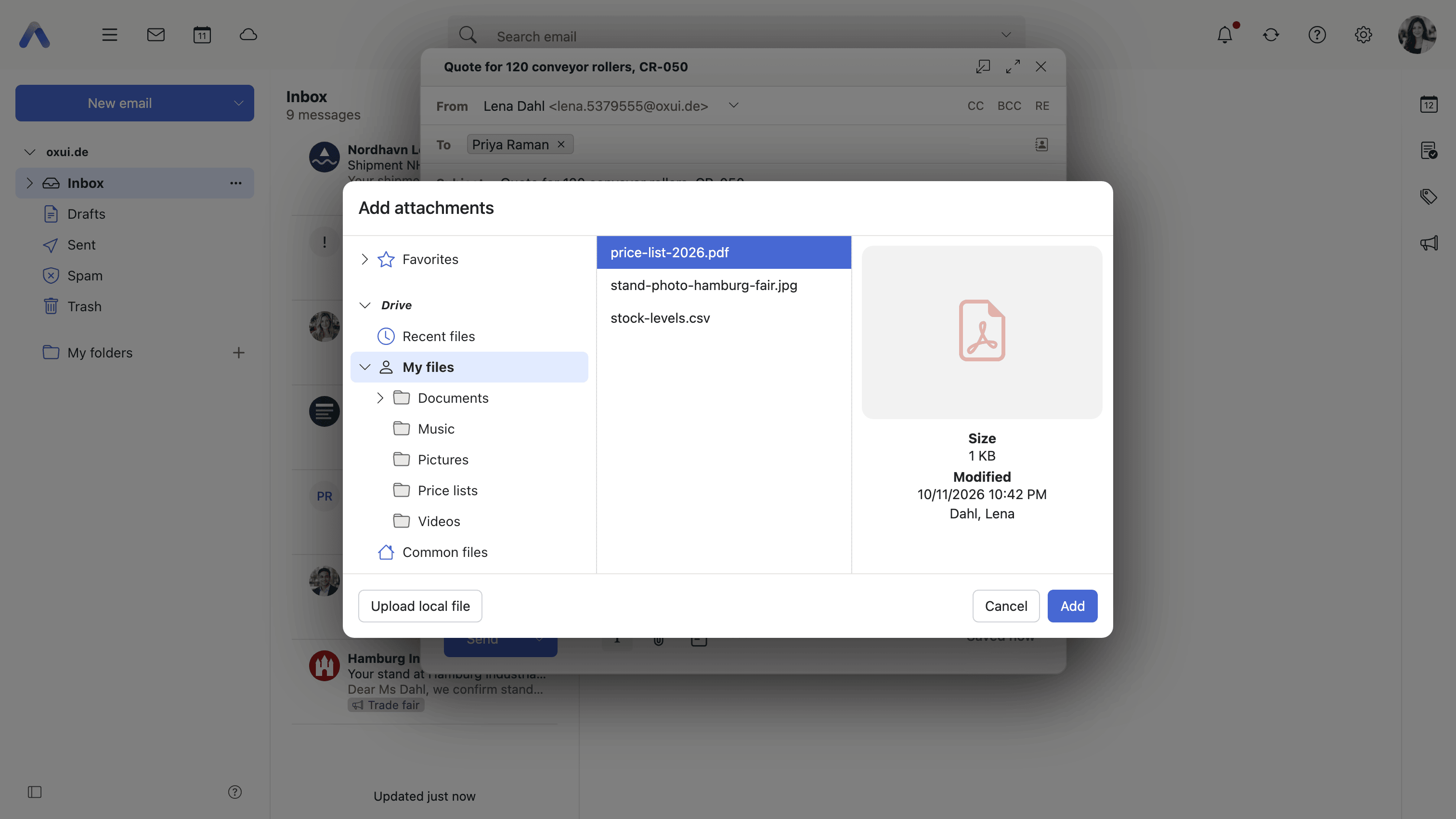
Why it matters The alternative is the detour everybody knows: download the file, find it in the downloads folder, attach it, and leave a copy behind that somebody edits two weeks later believing it is the current one. It also fails outright on a phone or a shared machine, where the local disk is either awkward or not the user's. Picking the file where it already lives is one step instead of three, and what gets attached is the version that is in Drive at that moment.
Description
- Add from Drive in mail compose's attachment menu
- Add from Drive in the attachment area of appointments, contacts and tasks
- The picker browses the whole Drive tree, including Favorites and Recent files
- PIM attachments as a whole, and the Drive button on them, can each be switched off separately
- What happens to the attachment on the mail side is described under Attachments
Availability Since 8.14. Requires infostore and filestore, and Middleware 8.8 or newer. Feature toggles attachFromDrive and PIMAttachments, both on by default.
Save an attachment into Drive
Summary The same journey in reverse. An attachment on a message, an appointment, a contact or a task is written straight into a Drive folder of the user's choosing, so that something which arrived as a file on one item ends up filed with the rest of the user's files.
Why it matters An attachment is only as findable as the item it came on, and that is not very findable at all a few months later — the contract is somewhere inside a thread whose subject nobody remembers, and searching for it means reconstructing the message around it first. Moving it into Drive puts it where files are looked for, where it can be shared, renamed and kept beside the rest of the material it belongs to, and where it survives the folder being cleared out.
Description
- Save to Drive in the attachment menu in Mail and in the PIM apps, and in the viewer's toolbar
- A folder picker chooses the destination, with the trash left out of it
- Not offered for attachments that are only references, or for one coming from a federated share
- The mail side of the same action is described under Attachments
Availability Since 7.10.6 or earlier. Requires infostore.
Browse your mail attachments in Drive
Summary A section of the Drive folder tree that lists the attachments in the mailbox as though they were files: All attachments at the top, and under it one folder per mail folder the deployment has configured. The listing is browsed, sorted and searched like any other folder in Drive.
Why it matters People remember files far better than they remember the messages that carried them — the name of a spreadsheet, roughly when it turned up, who sent it. Searching a mailbox for a file means reconstructing the message around it first, which is the part that has been forgotten. Listing the attachments as files lets the same mailbox be scanned the way the user is already thinking about it, and it does so without copying anything: the files stay on their messages.
Description
- An Email attachments section with an All attachments folder at its top, and one folder per configured mail folder beneath it
- The listing refreshes when mail arrives, or is deleted, moved or archived
- Present only where the deployment has configured the folders
- The section can be reordered and hidden like the other sections of the Drive tree
- Mail's own way into the same folder is described under Attachments
Availability Since 7.10.6 or earlier. Requires infostore. Shown only where the deployment configures the folders, with io.ox/core//folder/mailattachments. Presenting them as a section of the Drive tree, which can be reordered and hidden alongside the storages, arrived in 8.54.
Send files by email
Summary Opens mail compose with the selected Drive files already attached, from the Drive toolbar or the context menu. Several files can be sent in one step, and what the recipient gets is the file as it stands in Drive at that moment.
Why it matters Not everyone who needs a file should be given access to the folder it is in, and plenty of recipients are outside the organization altogether. For them a message with the file on it is still the correct answer, and it is the one they expect. Starting from the file rather than from an empty compose window means the attachment step is already done and cannot be the thing that is forgotten — which is what the follow-up message saying sorry, forgot the attachment exists to fix.
Description
- From the Drive toolbar and the context menu
- Several files are attached in one step; files with no content are skipped
- Not offered in the trash, on an older version of a file, or when Drive was opened from mail compose in the first place
Availability Since 7.10.6 or earlier. Requires webmail and infostore.
Put a file on the Portal
Summary Adds a Drive file to the Portal as a widget of its own, sitting among the other Portal content. The file stays there until it is taken off again, so something that matters this month is on the page the user opens first rather than several folders down.
Why it matters A folder tree is organized by where things belong, not by what is being worked on right now, and those are rarely the same thing. The document being revised this week is three folders deep in a structure built for an archive, and reaching it is a handful of clicks repeated several times a day. Putting it on the start page costs one click once and removes all of them. It also says something to the user about the file: this one is still open.
Description
- Add to portal in the context menu and in the viewer's toolbar
- Portal carries Recently changed files and My latest files widgets alongside it
- Not offered in the trash or on an older version of a file
Availability Since 7.10.6 or earlier. Requires portal and infostore. Part of the Provider Edition — without it there is no Portal to put anything on. The Portal itself is described under Portal.