Lists and the other apps
A distribution list is the address book's own answer to writing to the same group over and over. The rest of this page is the address book meeting everything around it: a contact passed on in a message, an address picked up from one, a list pinned to the portal, a colleague called, and contacts carried in and out as files or onto paper.
Create a distribution list
Summary A named group of email addresses, stored in an address book like a contact and usable anywhere a recipient is picked. Members are chosen from the address book or typed in as plain addresses, and from then on the whole group is addressed by one name — in a message, in an invitation, in a sharing dialog.
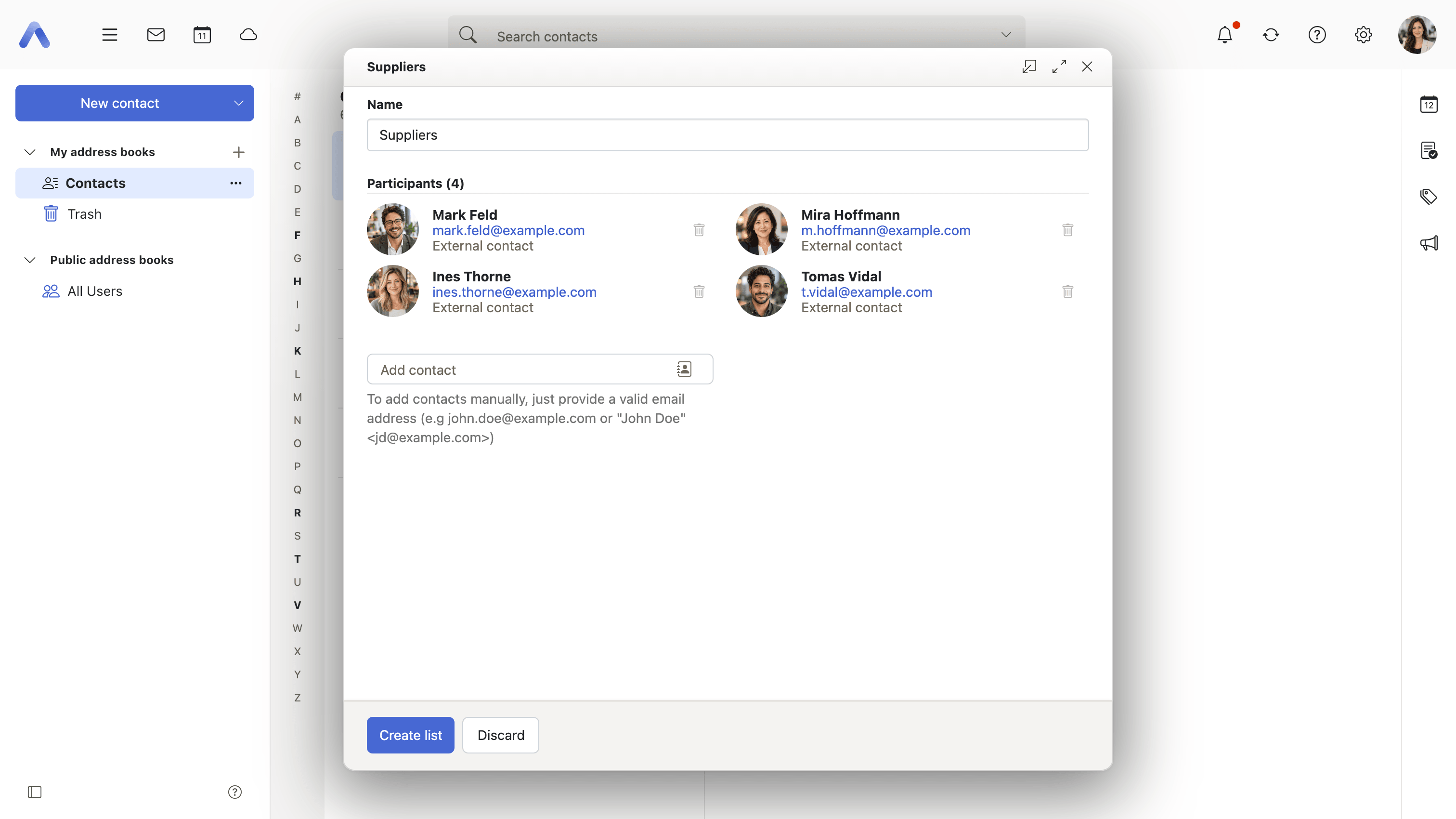
Why it matters Some groups are written to every week and exist nowhere: the project, the five people who sign off a release, the parents of a class. Assembling them by hand means digging the last message out of the sent folder and copying its header, and whoever is missed in that copy is quietly dropped from the conversation — they do not know they were left out, and neither does the sender. A named list turns the group into something that is corrected once, when somebody joins or leaves, instead of at every message. It also makes the membership reviewable: a list can be opened and read, where a recipient line copied from an old mail can only be squinted at.
Description
- New distribution list opens a window of its own, where the list is named and its members are added
- Members come from the address book through Add contact, or are typed in as a plain email address
- A member without a usable email address is reported and left out
- A list is addressed, moved, copied, sent as a vCard, printed and deleted like any other entry
- Not offered on smartphones
Availability Since 7.10.6 or earlier. Requires contacts. Not on smartphones. Saving the participants of a meeting as a list is described under People and invitations, and building one from the recipients of a message under Working with the other apps.
Add a distribution list to the Portal
Summary Pins a distribution list to the portal as a widget of its own, so the group sits on the start page rather than inside the address book. It is offered only for lists, and only for a list that is not already on the portal.
Why it matters A list that is written to several times a week is still three steps away: open the address book, find the list, start the message. On the portal it is on the page that is opened first anyway, next to the rest of what the user watches. The restriction to lists is the sensible one — a single contact is reached by typing a few letters into a recipient field, while a group is the thing worth keeping in view.
Description
- Add to portal on a distribution list
- Not offered for a list that is on the portal already
Availability Since 7.10.6 or earlier. Part of the Provider Edition. Requires portal. The portal itself is described under Portal.
Send a contact as a vCard
Summary Opens the mail composer with the selected contacts attached as vCard files. What the recipient gets is data rather than a block of text, so it goes into whatever address book they use without being read out and typed back in.
Why it matters The usual way of passing a contact on is to write the name, the address and the phone number into the body of a message, and the usual outcome is that the recipient types them back out again, with a transposed digit somewhere in the middle. A vCard is understood by every mail client and address book worth the name, so the contact arrives complete and with the fields the sender filled in — which also means the job title and the department survive the trip, not just the address.
Description
- Send as vCard opens the composer with the contacts attached
- Works on a selection of several contacts, and on distribution lists
Availability Since 7.10.6 or earlier. Requires webmail.
Add an unknown address to the address book
Summary Turns an address with no contact behind it into a real one in the user's default address book. It is offered on an address shown in Mail, and on the entries of the collected-addresses folder — the book Mail fills by itself from the messages the user sends and reads.
Why it matters Most of the addresses a person corresponds with are never written down. They live in the sent folder and are found again by searching for an old message, which works until the name turns out to be spelled differently from what was expected or the thread has been cleared out. Promoting an address to a contact in one step, from where it is already on screen, is what makes the address book fill up at all: nobody opens the address book specifically to type an address into it.
Description
- Add to address book on an address that has no contact behind it, and on entries in the collected-addresses folder
- Opens the contact editor prefilled with what is already known, and saves into the default address book
- The collected-addresses folder is filled by Mail, under its collect-while-sending and collect-while-reading settings
Availability Since 7.10.6 or earlier. Requires contacts. Which folder collects addresses, and whether collecting happens at all, are set with io.ox/mail//contactCollectFolder, io.ox/mail//contactCollectOnMailTransport and io.ox/mail//contactCollectOnMailAccess. The collecting itself is described under Writing and sending.
Import and export contacts as vCard or CSV
Summary Reads contacts into an address book from a vCard or CSV file, and writes a selection or a whole book back out again. Both sit in the folder's context menu, and a vCard that arrives as a mail attachment can be imported straight from the message.
Why it matters Contacts that can only be reached through one client are contacts an organization does not really own. Somebody arriving from another provider has them in a file and needs them read in; somebody leaving, or simply wanting a copy of their own, needs them written out. CSV matters separately from vCard: it is the format a spreadsheet and most line-of-business systems produce, which is how a list of several hundred customers reaches an address book without anybody typing it.
Description
- Import accepts vCard (.vcf, .vcard) and CSV, started from the folder's context menu
- Export offers vCard and CSV, and runs on a selection or on a whole address book
- A vCard attached to a message can be imported from the message itself
Availability Since 7.10.6 or earlier. Requires contacts. The shared import and export dialogs are described under Working with content.
See upcoming birthdays
Summary Contacts with a birthday turn up in the notification area shortly before the date, with the age where a year of birth is recorded. The entry says Today or Tomorrow rather than giving a date, and the wording is kept right as midnight passes.
Why it matters A birthday stored on a contact is a date nobody ever looks at: it sits in a field on a record that is only opened when somebody needs a phone number. Remembering it therefore depends on the user already knowing, which defeats the purpose of having written it down. Raising it a day or two ahead turns the field into the reminder it was meant to be, and the lead time is the part that matters — a birthday one hears about on the day is one that is already late.
Description
- Birthdays appear in the notification area shortly before the date, with the age where a year of birth is known
- The relative day is shown — Today, Tomorrow — and refreshed so it stays correct across midnight
- Birthdays are read as floating dates, so they do not shift with the user's time zone
Availability Since 8.4. Requires contacts. Birthday reminders can be switched off with io.ox/core//showBirthdayNotifications. The notification area itself is described under Notifications and What's New, and a calendar assembled from the same dates under Calendars and subscriptions.
Call a colleague via Zoom
Summary A Call via Zoom entry on a colleague's contact in the global address book starts an instant Zoom meeting and shows the join link, with a button to copy it. Nothing is scheduled: the meeting exists from the moment the entry is used.
Why it matters Plenty of conversations are not worth an appointment — a question about a document, a two-minute decision — but the only video route most products offer runs through the calendar, which means inventing a title, picking a time and sending an invitation for something that should have taken as long as a phone call. Starting from the person rather than from the calendar removes all of that, and because the contact comes from the directory, the colleague on the other end is the right one rather than whoever matched a name.
Description
- Call via Zoom on a contact from the global address book that has an email address
- Offered only while the switchboard service is online, and disabled on the user's own contact
- Creates an instant meeting and shows the join link, with Copy to clipboard
- Asks for the Zoom account to be connected first where it is not linked yet
Availability Since 8.15. Part of the Provider Edition. Requires switchboard with the Zoom integration service. Feature toggle zoom, on by default, and io.ox/zoom//enabled has to be set, with the service address in io.ox/zoom//host. Zoom in the calendar, and connecting the account itself, are described under Video meetings.
Print contacts
Summary Prints the selected contacts, either as full detail sheets or as a compact phone list. A dialog asks which of the two, showing what is about to come out, and the choice is remembered for the next time.
Why it matters Paper is still how contact data travels into the parts of an organization a browser does not reach: a phone list pinned up in a workshop, a sheet taken to a customer visit, a printout for whoever is covering a desk next week. The two layouts answer two different needs — the detail sheet is one person in full, the phone list a whole department on one page — and remembering the choice is worth more than it sounds, because whoever prints a phone list prints it again next month.
Description
- Print opens a Select print layout dialog showing the result before it is printed
- Detail sheets print a contact in full; the phone list prints name, department, city, numbers and email compactly
- The chosen layout is remembered for the next print
- A deployment can force the list form, in which case printing is offered for distribution lists too
- Not available on smartphones
Availability Since 7.10.6 or earlier. Requires contacts. Not on smartphones. The layout is remembered in io.ox/contacts//contactsPrintLayout, and io.ox/contacts//features/printList forces the list form. Printing across the application is described under Getting around.