Finding people
The three ways a person is looked up, depending on where the question comes from: searching the address book itself, choosing recipients while a message or an invitation is being written, and querying a corporate directory far too large to browse.
Search contacts
Summary The Address Book's search, with named filters for name, email address, phone number, business, postal address, note and categories. A filter is typed straight into the field as phone:0151 or picked from the search dropdown, and free text without a filter searches across all of them at once.
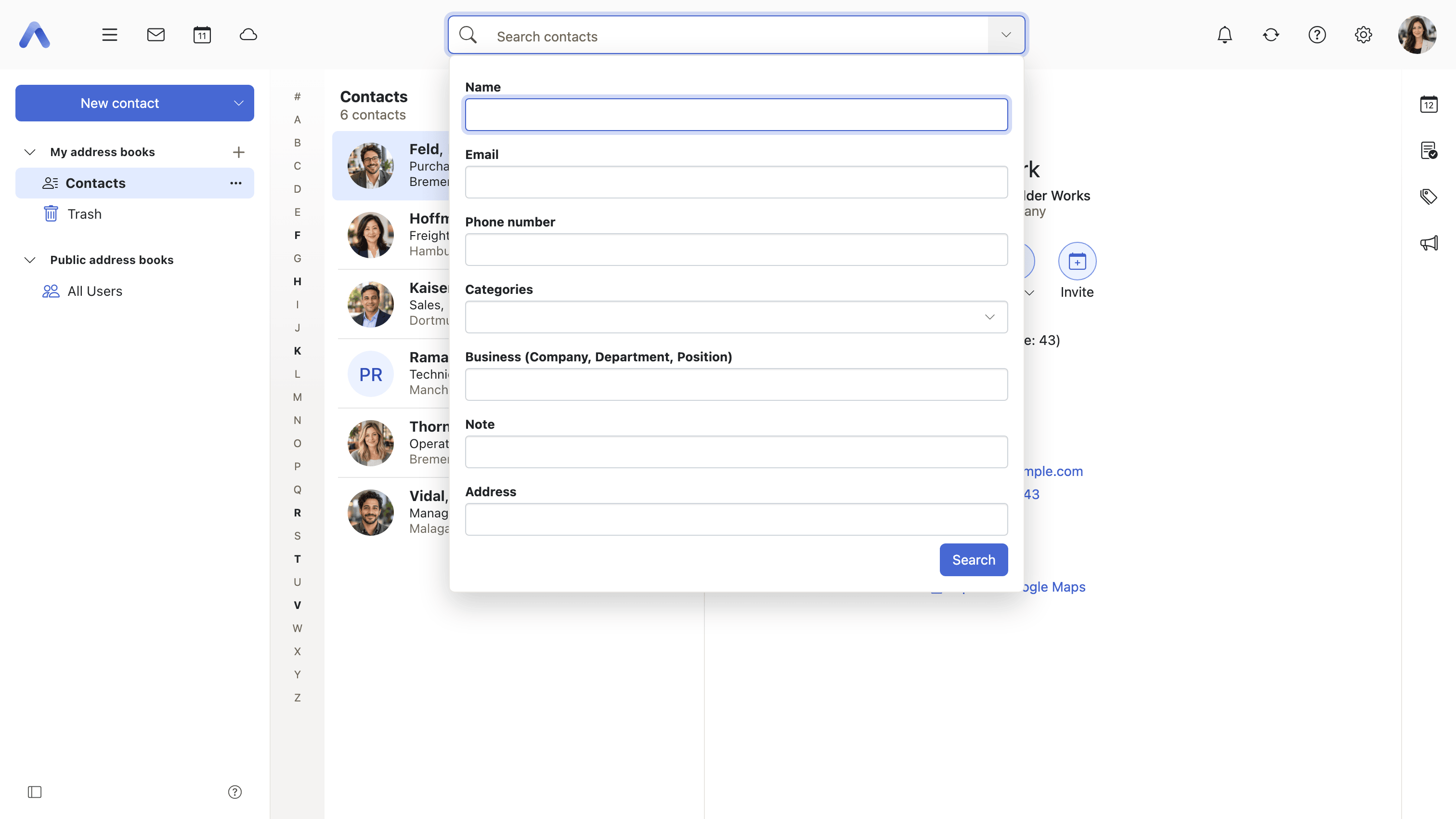
Why it matters A personal address book is browsable for a year or two; a global directory with the whole organization in it never was, and neither is a personal one after a decade of collecting addresses. The filters matter as much as the search field does, because people look for a colleague by whatever they happen to know — the company, the number showing on a screen, the street from an old invoice, the note somebody wrote about who this person is. A search that only covered names would send them back to scrolling for everything else.
Description
- Filters cover name, email address, phone number, business, postal address, note and categories
- Filters are typed into the field as
phone:0151, in the user's own language as well as in English, or picked from the search dropdown - Free text searches across those fields at once, and the dropdown suggests which filter is meant
- The categories filter only appears where categories are switched on
- Which fields may be searched is configurable, which mostly shapes the directory lookup below
- A shortest query length is enforced, and the same minimum is applied by the server
- The search field itself, shared by every app, is described under Getting around
Availability Since 7.10.6 or earlier. Requires contacts. The fields search is allowed to cover come from io.ox/contacts//search/fields, and the shortest query that is sent from io.ox/contacts//search/minimumQueryLength.
Pick recipients from the address book
Summary The dialog that opens wherever people have to be chosen — writing a message, inviting participants to an appointment or a task, sharing a folder. It searches across the user's address books together with distribution lists, groups and resources, and hands the chosen addresses back to whatever opened it.
Why it matters Typing an address from memory is how mail reaches the wrong person, and autocomplete only helps for people who have been written to before. Everyone else has to be looked up, and if looking them up means abandoning a half-written message the sender will guess instead. One dialog shared by Mail, Calendar, Tasks and the sharing dialogs also means there is one thing to learn: the filter that narrows an invitation to a department is the same filter that narrows a share, so nobody has to discover the address book twice.
Description
- Searches the user's own, public and shared address books, and filters by all distribution lists, all groups, or resources
- Where the global address book records departments, results can be narrowed to one of them
- Results come from an index built in the browser and are listed a page at a time, with a step that shows more
- A caller can restrict the dialog to the global address book, or hide resources from it
- A warning appears once where the address book holds more entries than the dialog fetches, so that some of them are missing from it
- Writing the message the recipients are picked for is described under Writing and sending
Availability Since 7.10.6 or earlier. Requires contacts. How much the dialog fetches, lists, searches, and offers behind the step that shows more comes from the io.ox/contacts//picker/limits settings. Where the directory lookup below is switched on, it replaces this dialog entirely.
Look people up in a large directory
Summary A second address picker, meant for deployments whose directory is far too large to hold in the browser: every search is answered by the server rather than by an index built on the client. Once it is switched on it takes the place of the standard picker everywhere, and it can also be opened on its own, as Address directory, from the app launcher and the quick launch bar.
Why it matters In a company of fifty thousand people an alphabetical list is not a way of finding anybody — it is a list nobody will scroll, and pulling it into the browser so that it can be searched there costs a wait every time the dialog opens and a great deal of memory for what is usually a search for one person. Letting the server answer makes the size of the directory the server's problem, which is the only place it can be solved. The list of recently searched people pays for itself in the same setting: in a directory that size most lookups are for the same handful of colleagues.
Description
- Every search is run by the server, so no part of the directory has to be loaded into the browser first
- It replaces the standard address picker for every caller once it is switched on
- A list of recently searched contacts is kept per user and offered when the picker opens
- Address directory opens it on its own from the app launcher, the quick launch bar and, optionally, a button in the top bar
- Only address books flagged for use in a picker are offered, unless that filter is switched off
Availability Since 8.48. Requires contacts. Feature toggle enterprisePicker, off by default — a deployment switches it on with io.ox/core//features/enterprisePicker/enabled. Not offered on smartphones. The two launchers are controlled by io.ox/core//features/enterprisePicker/showLauncher and showTopRightLauncher, and how many results and recent contacts are kept by io.ox/contacts//enterprisePicker/limit and io.ox/contacts//enterprisePicker/lastSearchedContactsLimit.