Calendars and subscriptions
Where the appointments in a user's calendar come from. Some are kept here, some belong to other people or to the whole organization, some are pulled in read-only from a publisher elsewhere, and some have to make the trip back out to the calendar app on a phone.
All my public appointments
Summary A single entry in the calendar list that gathers every appointment the user takes part in, wherever in the public calendars it happens to sit. It is not a folder anybody created — the product assembles it — so it is ticked and unticked like a calendar, but there is nothing in it to edit or share.
Why it matters A public calendar is a place where an appointment can be made for somebody who is not watching that calendar. Nobody subscribes to all of them, so a user invited to a meeting held in a department's calendar they have never opened has no reason to find out about it: the appointment exists, they are an attendee, and it appears nowhere they look. Starting from the user instead of from the folder closes that gap, and a missed meeting is an expensive way to discover one was scheduled.
Description
- Appears as its own entry in the calendar list, with a checkbox like any other calendar
- Collects the appointments the user takes part in across every public calendar
- While it is selected, individual public calendars are not added to the selection as well
- Present for everyone except guests, and ticked from the start for a new user who may edit public folders
Availability Since 7.10.6 or earlier. Requires calendar. Not available to guest users.
Add yourself to a public appointment
Enterprise
Summary An appointment in a public calendar offers Add me to this appointment to a user who is not yet among its attendees. One click puts them on the attendee list as accepted, with their default reminder, without anybody having to send an invitation.
Why it matters Public calendars are where an organization puts the things anyone may come to: a company meeting, a training session, a team's open office hour. Until now, seeing such an appointment and taking part in it were two different things — joining meant asking the organizer for an invitation, or copying the appointment into one's own calendar, where it no longer changes when the original does. Joining the appointment itself means it shows up in the user's own schedule, reminds them like any other, and stays up to date.
Description
- The button sits in the appointment's detail view, and is shown only in a public calendar the user may write to, and only while they are not an attendee already
- The user is added as accepted, next to the existing attendees, with their default reminder
- For a recurring appointment the user picks whether to join just this occurrence or the whole series
- Joining runs the usual conflict check, so a clash with the user's own appointments is pointed out before it is saved
Availability Since 8.47. Requires calendar and write permission on the public calendar the appointment is in.
Subscribe to shared and public calendars
Enterprise
Summary A dialog listing the calendars other people have shared, the public ones and the user's own, each with a checkbox deciding whether it appears in the calendar list at all. It is reached from the folder menu and from calendar settings, as Subscribe to shared calendars.
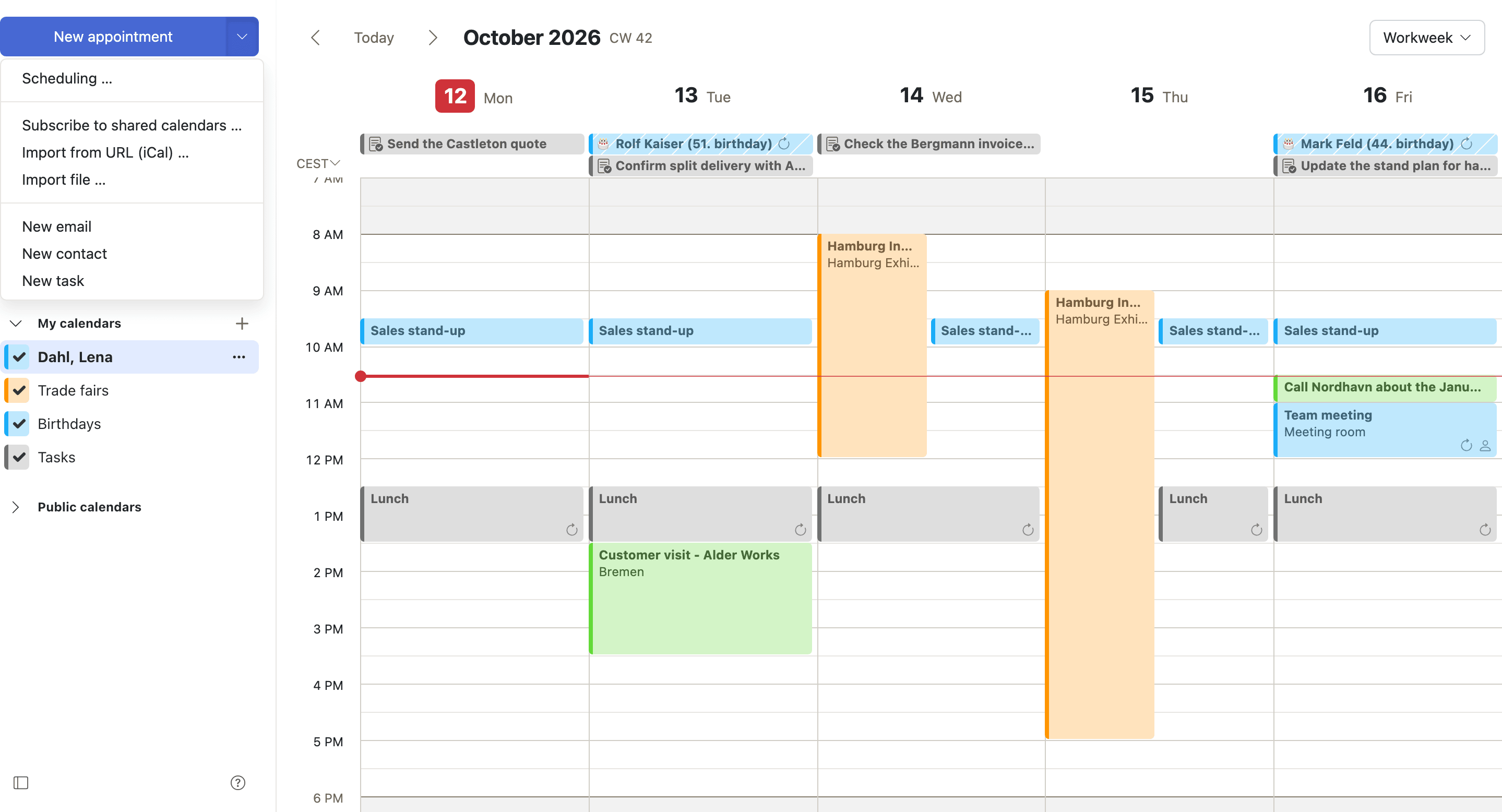
Why it matters Being given access to a calendar and wanting to see it every day are different things, and in a large installation generous sharing means a tree of calendars nobody asked for. In the calendar this costs more than clutter: the list doubles as the view selector, so every subscribed calendar paints colored blocks across the user's week, and a handful of them is enough to make the grid unreadable. Unsubscribing hides a calendar without touching anybody's sharing, so nothing has to be renegotiated with the person who shared it.
Description
- Sections for public, shared, private and hidden calendars, with a checkbox each
- Where CalDAV is available, a second checkbox per calendar decides whether it is also synchronized to devices
- Also offered as a button in calendar settings
Availability Since 7.10.6 or earlier. Requires edit_public_folders, read_create_shared_folders or caldav. The same thing for folders in the other apps is described under Sharing and delegation.
Birthday calendar
Summary A calendar the product assembles from the birthdays stored on the user's contacts, rather than a folder somebody fills. A checkbox in calendar settings shows or hides it, and it carries its own default reminder, kept apart from the one used for ordinary all-day appointments.
Why it matters The dates are already in the address book, and copying them into the calendar by hand is work nobody does twice — the second year's contacts are missing and the list quietly rots. Generating the calendar instead means a birthday is correct for as long as the contact is. The separate reminder is doing more work than it looks: the default warning for an all-day appointment is usually the same morning, which is too late to do anything about a birthday except apologize.
Description
- Show birthday calendar in calendar settings shows or hides it
- Entries come from contacts, so there is nothing in the calendar itself to create, edit or share
- Default reminder for birthdays applies only to this calendar
- Birthday entries are all-day, so only the all-day reminder is offered for them
Availability Since 7.10.6 or earlier. Requires calendar_birthdays. The reminder is stored in io.ox/calendar//birthdays/defaultAlarmDate.
Subscribe to an iCal feed
Summary Adds a calendar from the address of an .ics file published somewhere on the internet — public holidays, a league's fixtures, a team's duty roster. The feed arrives as a read-only calendar and the server keeps it up to date, so nothing is copied once and left to go stale.
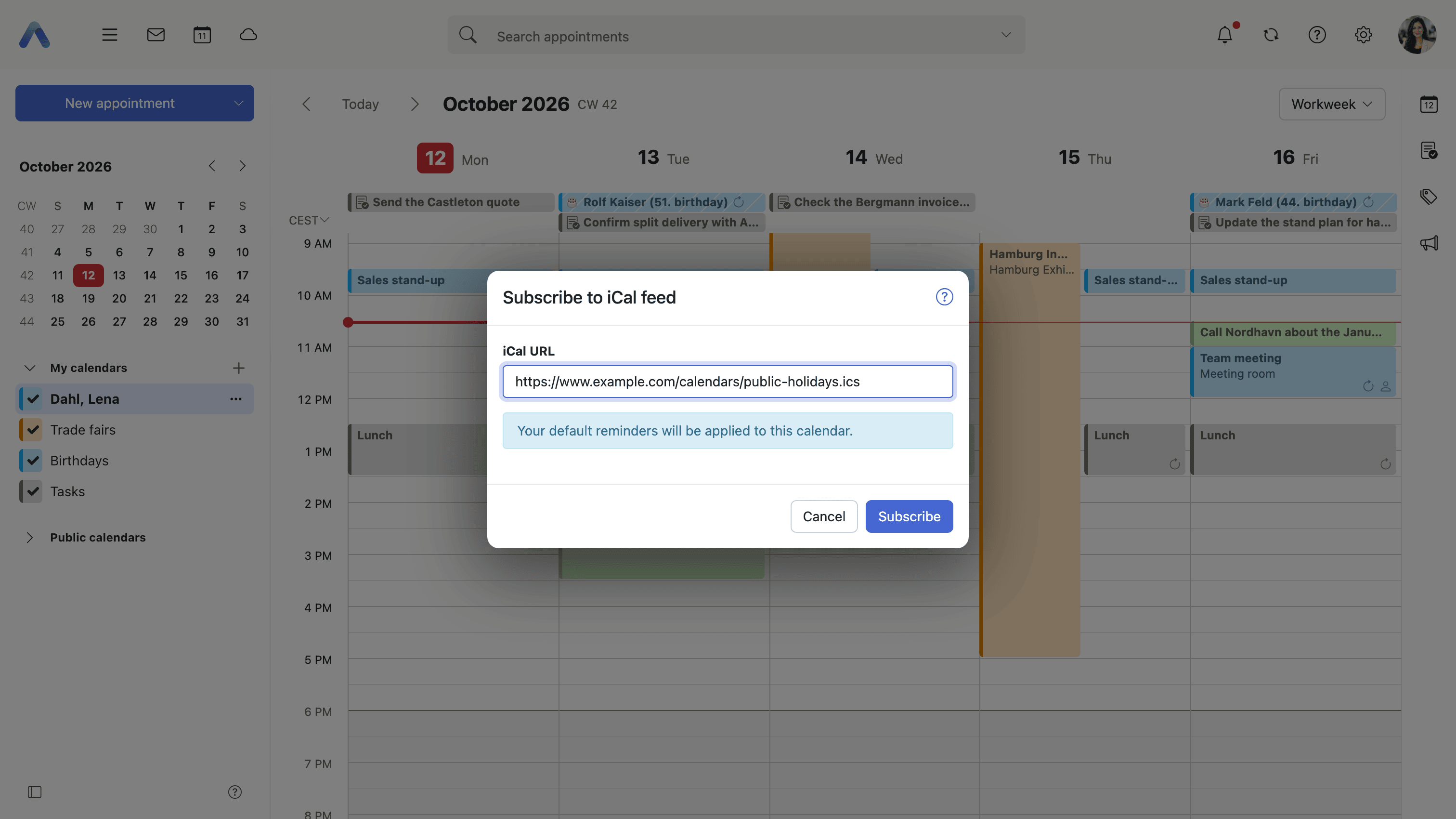
Why it matters The alternative is importing the file, and an imported file is a photograph: when a fixture moves or a public holiday list is corrected, the user's calendar still shows the old version and nobody remembers to import it again. A subscription keeps the publisher as the single source of the dates. That the calendar is read-only is the point rather than a shortcoming — these are somebody else's appointments, and the only sensible local edit is to stop subscribing.
Description
- Enter the iCal URL, with a login and password where the feed asks for them
- The calendar is read-only, and the server refreshes it from the source
- The user's default reminders apply to the appointments it contains
- Reached from the calendar's secondary menu, as Import from URL (iCal)
- The feed address is shown again in the calendar's properties dialog, with a button to copy it
Availability Since 8.3. Requires calendar_ical.
Subscribe to a Google calendar
Summary Connects a Google account and adds its calendars to the list. This is not the same thing as an iCal feed: a feed is an address pointing at a file, while this is an account connection, made by signing in at Google in a popup. No Google password is entered here, and what arrives is the account's calendars rather than one published file.
Why it matters Plenty of people keep their private appointments in Google and their working ones here, and the cost of the split is double-booking — an evening already spoken for is invisible when the meeting is accepted. The distinction from a feed decides what is possible at all: a personal Google calendar is not published at a public address, so there is no URL to subscribe to, and an authorized account connection is the only route to it. It also means the grant can be withdrawn later from either end.
Description
- Google's own sign-in runs in a popup, and the connection is authorized there
- Calendar access is requested read-only
- The account's calendars are added to the calendar list
- Reached from the calendar's secondary menu, as Subscribe to Google calendar
Availability Since 8.3. Requires calendar_google, with a Google service configured in the Middleware that offers calendar access. Connecting accounts held at other providers is described under Onboarding and devices.
Sync a calendar to a device over CalDAV
Summary A calendar's properties dialog shows its CalDAV URL, with a button to copy it, so the calendar can be added to the calendar app on a phone or to a desktop client. A checkbox beside it decides whether that particular calendar is offered for synchronization at all.
Why it matters A device set up over CalDAV works on the same appointments rather than on a copy of them, so an appointment accepted on the phone at a station is accepted here too, and there is one answer to the question of what the user is doing on Thursday. The per-calendar switch is what keeps that usable: somebody who has subscribed to twenty shared and public calendars does not want all twenty on their phone, and without the choice the usual response is to synchronize nothing.
Description
- The properties dialog of a calendar shows its CalDAV URL, with a button to copy it
- Enable CalDAV synchronization for this folder decides whether the calendar reaches devices
- The shared-calendars dialog carries the same per-calendar switch
- Appointments can be read and edited in the device's own calendar app
Availability Since 8.46. Requires caldav. Setting the device itself up — which server names to type, or a configuration profile to download — is done by the wizard described under Onboarding and devices.
Calendars from a shared account
Enterprise
Summary The calendars belonging to a shared account, such as info@ or a team address, appear in the user's calendar list under their own heading and labeled with the account's name. Invitations addressed to that account can be answered from there, and the response goes out as the account rather than as whoever happened to click.
Why it matters A team address that receives meeting invitations has nowhere to put them. What happens instead is that one person accepts on their own behalf: the organizer's attendee list shows a personal name, the appointment lands in a personal calendar, and the rest of the team cannot see that the commitment was made — nor can they cover it when that person is away. Keeping the account's schedule with the account rather than with a colleague also means it survives their leave, their holiday and their resignation.
Description
- Calendars of a shared account appear in the calendar list under Shared accounts, labeled with the account name
- Responses and the sender address use the shared account's address instead of the user's own
- What the user may do follows the permissions they hold on that account; viewer-only access cannot change an attendee's status
- An appointment can be moved between calendars of the same shared account
Availability Since 8.48. Requires shared_accounts, and is not available to guest users. Feature toggle sharedAccounts, on by default. The mail side of the same account is described under Accounts and automation.