
Shared Accounts deprecated
Introduction
Shared accounts are special groupware accounts that are used as additional account in App Suite by one or more users collaboratively. They are registered in the system similarly like regular users with their mail address, however, they're not meant to be used alone, hence one cannot log in to them directly in App Suite.
Comparable with shared mailboxes on Microsoft Exchange, they typically serve a particular purpose in the team or organization, like a generic support@example.com or inquiries@example.com channel, or serve as entry point to a department like sales@example.com or janitorial@example.com.
In contrast to secondary accounts which only provide access to a further email account, shared accounts are full-featured groupware accounts with dedicated access to the calendar module, and are managed as such together with their own set of settings like signatures or mail filter rules.
Configuration
Feature Activation
To enable the shared account feature globally within the core middleware service, the com.openexchange.sharedaccount.enabled property needs to be set to true in your chart's values.yaml:
core-mw:
  properties:
    com.openexchange.sharedaccount.enabled: "true"
Enable for Users
To enable usage of shared accounts for users without using the global feature activation, the property com.openexchange.sharedaccount.enabled needs to be set to true. The property can be defined through the config-cascade. After the feature is enabled, the corresponding capability shared_accounts is indicated to App Suite UI and available shared accounts can be used.
Provisioning
Managing shared account access consists of the registration of the shared account as such, then granting permissions to use it to users and/or groups.
Shared Account
Just like regular user accounts, shared accounts are meant to be provisioned explicitly in App Suite using dedicated operations (e.g. via SOAP). Along with that, the IMAP and SMTP settings need to be provided of the underlying mail account to use. As access to this mail account is shared among multiple App Suite users, different authentication options can be chosen, see Authentication below.
All groupware data of the shared account entities is stored within the database, and a specific context needs to be assigned to them during provisioning. However, it is still possible to use shared accounts across context boundaries, i.e. from users of different contexts.
Besides the SOAP interface whose .wsdl definition is exposed at /webservices/OXSharedAccountService?wsdl, also a couple of commandline utilities are available. See Command Line Tools/Shared Accounts for further information.
Throughout the provisioning APIs, shared account entities are always identified using a tuple of their internal context- and entity identifiers. Consequently, a create operation within a specific target context will yield the entity identifier as result, which can then be used in the following steps when making the account available to users.
Within a context, the entity identifier for shared accounts acts equally as the internal user identifier for regular user accounts, and both will never overlap. Similarly, shared account entities will account to the context's quota restrictions, both for amount- and size-based quotas.
Shared Account Permissions
After a shared account entity has been created, it can be made accessible to other users in a second step. This can be achieved by granting shared account permissions, either through dedicated SOAP calls (also within OXSharedAccountService), or via the command line.
As mentioned earlier, permissions to use a shared account can be granted to users or groups of a certain context, also if the shared account entity has been created in a different context before. Granting a permission is authenticated against the context the shared account entity has been provisioned into, since handing out access to a shared account is an act of the context owning it. Revoking a permission is accepted from either side, i.e. with the credentials of that context administrator as well as with those of the administrator of the context the users and groups live in, so that both ends can end an existing access.
The targeted shared account is identified by its context- and entity identifier explicitly, while the users and groups are expected to be from the same passed context. That means that if a shared account is going to be used by users or groups from multiple contexts, the permissions need to be assigned in multiple calls.
For each permission record that is provisioned, it is possible to assign fine-grained permission sets and capabilities, e.g. viewer permissions to model read-only access, or special sendAs capabilities for full impersonation when sending email. Since shared account permissions can be granted to groups, access to the shared account will become available implicitly by group membership. This also means that a specific user may have multiple permissions to the same shared account entity assigned at the same time. Whenever this is the case, the maximum of all granted permissions and capabilities effectively applies.
See chapter Permissions and Capabilities below for further details about the available options.
Batch Permissions
As alternative option to the explicit createSharedAccountPermissions and deleteSharedAccountPermissions operations, it is also possible to assign all permissions to a certain shared account globally in a single call, using the setSharedAccountPermissions operation.
Within the body, the permissions for all users and groups across multiple contexts to a shared account are defined, modeling the target view of which permissions should be there afterwards. That means that permissions that are no longer contained are removed implicitly, existing ones are updated as needed (capabilities or permission set), and new ones are inserted.
Please note the following when assigning batch permissions: - While multiple permissions can be supplied in the call, it is required that they're unambiguous, i.e. each entity in a context is only listed once - It is still possible to include multiple setSharedAccountPermissions elements for different entities of the same context, e.g. when granting heterogeneous permission sets or capabilities - To remove all previously assigned permissions to the shared account in a context, the context can be supplied without further users/groups - A module configuration that is omitted for an entity, or supplied without permission level, leaves the module without a permission set of its own, so that the configured default permission set applies, see Permissions. Omitting it does not remove the module from the permission: the identifiers of the shared account's folders stay the same when a permission set is granted again later - In such a case where a context is listed empty (without entities), it is not allowed to add any other element referring to an entity from the same context - Authentication is required once, in the parent setSharedAccountPermissions element, for the context of the shared account itself. The administrators of the listed contexts do not have to be supplied - A sharedAccountPermissions element may still carry its own auth section for the respective context administrator. It is then verified in addition, which allows a caller that holds those credentials anyway to have them checked. Supplying a wrong one fails the call - Because a single credential is sufficient, the call can also be made over the HTTP provisioning gateway and any other interface that carries exactly one credential in the Authorization header
The inverse getSharedAccountPermissions operation lists all permissions currently granted to a shared account. Analogous to the assignment, a list of contexts to inspect is supplied within the body, and the permissions found for the shared account across all of them are returned. Each returned permission carries its own context identifier, so the result spans multiple contexts.
Please note the following when retrieving batch permissions: - At least one context needs to be supplied, and each context may only be listed once - Only the auth and ctx of each supplied contexts element are evaluated; any further entity-related fields are ignored - Authentication is required once, in the parent getSharedAccountPermissions element, for the context of the shared account. A contexts element may still carry its own auth section, which is then verified in addition
Cross-Context Permissions and Trust Zones
A shared account can be made available to users and groups of another context. Which context boundaries may be crossed is a deployment decision, expressed through the same trust zones that govern cross-context folder sharing and deputy permissions, see Cross Context Collaboration.
A permission for users or groups of another context is granted only if the shared account and that context share at least one trust zone tag. There is no separate switch for it. Tag the contexts that are meant to work together before granting across them, because an empty zone set denies by design.
A caller that holds authority over the other context anyway is exempt. Concretely, the policy is skipped whenever the credential in effect for that context authenticates against it - the one supplied for the entry if there is one, the credential of the call otherwise. That covers an administrator credential that is valid in both contexts, as well as a scoped provisioning token that covers the other context. Such a caller could always perform the grant directly, so the trust zones add nothing for it.
The policy is applied when a permission is granted, and only then. An access that already exists keeps working whatever the zones say afterwards, revoking is never restricted, and permissions inside the shared account's own context are unaffected. Re-sending an unchanged set of permissions grants nothing new and is therefore never rejected, so a provisioning client that states the effective target state on every run is unaffected as well.
The check needs a cross-context authority provider to be present, which the open-xchange-crosscontext package supplies. Without it the policy has nothing to evaluate and the grant is admitted, mirroring how cross-context folder sharing and deputy permissions behave in a deployment that did not install it.
Because a cross-context permission is stored in the context of the user or group it was granted to, the shared account's own context holds no record of it. Whenever such a permission is granted or revoked, the context that received it is therefore noted in a grant index kept alongside the shared account, which is what allows the account to be asked who has access to it - see listsharedaccountpermissionsbysharedaccount. The index is maintained automatically and reconciled by a daily background job, so an existing deployment does not need to do anything to populate it; note only that the job skips database schemas with a pending update task, so the picture completes once those updates have run.
SOAP Walkthrough
The following example shows SOAP requests to create a new shared account in context 1, then assign permissions for it in contexts 2 and 3.
Account Creation
Create a new shared account in context 1 with name/display_name using a create SOAP request.
<soapenv:Envelope xmlns:soapenv="http://schemas.xmlsoap.org/soap/envelope/" xmlns:soap="http://soap.admin.openexchange.com" xmlns:xsd="http://dataobjects.soap.admin.openexchange.com/xsd" xmlns:xsd1="http://dataobjects.rmi.admin.openexchange.com/xsd">
  <soapenv:Header/>
  <soapenv:Body>
    <soap:create>
      <soap:ctx>
        <xsd:id>1</xsd:id>
      </soap:ctx>
      <soap:sharedAccountData>
        <xsd:display_name>Support</xsd:display_name>
        <xsd:name>support</xsd:name>
        <xsd:email1>support@example.com</xsd:email1>
        <xsd:password>password</xsd:password>
        <xsd:primaryEmail>support@example.com</xsd:primaryEmail>
      </soap:sharedAccountData>
      <soap:auth>
        <xsd1:login>admin</xsd1:login>
        <xsd1:password>adminpassword</xsd1:password>
      </soap:auth>
    </soap:create>
  </soapenv:Body>
</soapenv:Envelope>
Permission Assignment
Now assign permissions to users in context 2 and 3 by using createSharedAccountPermissions SOAP requests. You can either use the id or name to identify a user, group or shared account. For each context of users and/or groups you need to create a separate SOAP request. The following request creates the permissions for users and groups in context 2.
<soapenv:Envelope xmlns:soapenv="http://schemas.xmlsoap.org/soap/envelope/" xmlns:soap="http://soap.admin.openexchange.com" xmlns:xsd="http://dataobjects.soap.admin.openexchange.com/xsd" xmlns:xsd1="http://dataobjects.rmi.admin.openexchange.com/xsd">
  <soapenv:Header/>
  <soapenv:Body>
    <soap:createSharedAccountPermissions>
      <soap:ctx>
        <xsd:id>2</xsd:id>
      </soap:ctx>
      <soap:users>
        <xsd:name>anton</xsd:id>
      </soap:users>
      <soap:users>
        <xsd:name>berta</xsd:id>
      </soap:users>
      <soap:groups>
        <xsd:id>8</xsd:id>
      </soap:groups>
      <soap:calendarConfig>
        <xsd:permissionLevel>editor</xsd:permissionLevel>
      </soap:calendarConfig>
      <soap:mailConfig>
        <xsd:permissionLevel>editor</xsd:permissionLevel>
      </soap:mailConfig>
      <soap:capabilities>
        <xsd:grantedCapability>sendAs</xsd:grantedCapability>
        <xsd:grantedCapability>sendOnBehalf</xsd:grantedCapability>
      </soap:capabilities>
      <soap:sharedAccountCtx>
        <xsd:id>1</xsd:id>
      </soap:sharedAccountCtx>
      <soap:sharedAccount>
        <xsd:name>support</xsd:name>
      </soap:sharedAccount>
      <soap:auth>
        <xsd1:login>admin</xsd1:login>
        <xsd1:password>adminpassword</xsd1:password>
      </soap:auth>
    </soap:createSharedAccountPermissions>
  </soapenv:Body>
</soapenv:Envelope>
The second createSharedAccountPermissions SOAP request creates the permissions for users in context 3.
<soapenv:Envelope xmlns:soapenv="http://schemas.xmlsoap.org/soap/envelope/" xmlns:soap="http://soap.admin.openexchange.com" xmlns:xsd="http://dataobjects.soap.admin.openexchange.com/xsd" xmlns:xsd1="http://dataobjects.rmi.admin.openexchange.com/xsd">
  <soapenv:Header/>
  <soapenv:Body>
    <soap:createSharedAccountPermissions>
      <soap:ctx>
        <xsd:id>3</xsd:id>
      </soap:ctx>
      <soap:users>
        <xsd:id>6</xsd:id>
      </soap:users>
      <soap:calendarConfig>
        <xsd:permissionLevel>editor</xsd:permissionLevel>
      </soap:calendarConfig>
      <soap:mailConfig>
        <xsd:permissionLevel>editor</xsd:permissionLevel>
      </soap:mailConfig>
      <soap:capabilities>
        <xsd:grantedCapability>sendAs</xsd:grantedCapability>
        <xsd:grantedCapability>sendOnBehalf</xsd:grantedCapability>
      </soap:capabilities>
      <soap:sharedAccountCtx>
        <xsd:id>1</xsd:id>
      </soap:sharedAccountCtx>
      <soap:sharedAccount>
        <xsd:name>support</xsd:name>
      </soap:sharedAccount>
      <soap:auth>
        <xsd1:login>admin</xsd1:login>
        <xsd1:password>adminpassword</xsd1:password>
      </soap:auth>
    </soap:createSharedAccountPermissions>
  </soapenv:Body>
</soapenv:Envelope>
Batch Permission Assignment
With the following call, permissions to the shared account "support" in context 1 are assigned to users/groups in multiple contexts, using different permission and capability sets. Authentication is provided explicitly for each context within the sharedAccountPermissions elements. Implcitly, any other previously granted permissions to this shared account are removed from all specified contexts.
<soapenv:Envelope xmlns:soapenv="http://schemas.xmlsoap.org/soap/envelope/" xmlns:soap="http://soap.admin.openexchange.com" xmlns:xsd="http://dataobjects.rmi.admin.openexchange.com/xsd" xmlns:xsd1="http://dataobjects.soap.admin.openexchange.com/xsd">
   <soapenv:Header/>
   <soapenv:Body>
    <soap:setSharedAccountPermissions>
     <soap:auth>
      <xsd:login>oxadmin1</xsd:login>
      <xsd:password>secret</xsd:password>
     </soap:auth>
     <soap:sharedAccountCtx>
      <xsd1:name>1</xsd1:name>
     </soap:sharedAccountCtx>
     <soap:sharedAccount>
      <xsd1:name>support</xsd1:name>
     </soap:sharedAccount>
     <soap:sharedAccountPermissions>
      <xsd1:auth>
         <xsd:login>oxadmin1</xsd:login>
         <xsd:password>secret</xsd:password>
      </xsd1:auth>
      <xsd1:ctx>
         <xsd1:id>1</xsd1:id>
      </xsd1:ctx>
      <xsd1:groups>
         <xsd1:id>19</xsd1:id>
      </xsd1:groups>
      <xsd1:capabilities>
         <xsd1:grantedCapability>sendAs</xsd1:grantedCapability>
         <xsd1:grantedCapability>sendOnBehalf</xsd1:grantedCapability>
         <xsd1:grantedCapability>snippets</xsd1:grantedCapability>
      </xsd1:capabilities>
      <xsd1:calendarConfig>
         <xsd1:permissionLevel>author</xsd1:permissionLevel>
      </xsd1:calendarConfig>
      <xsd1:mailConfig>
         <xsd1:permissionLevel>author</xsd1:permissionLevel>
      </xsd1:mailConfig>
     </soap:sharedAccountPermissions>
     <soap:sharedAccountPermissions>
      <xsd1:auth>
         <xsd:login>oxadmin6</xsd:login>
         <xsd:password>secret</xsd:password>
      </xsd1:auth>
      <xsd1:ctx>
         <xsd1:name>context6.ox.test</xsd1:name>
      </xsd1:ctx>
      <xsd1:users>
         <xsd1:name>berta</xsd1:name>
      </xsd1:users>
      <xsd1:users>
         <xsd1:name>dora</xsd1:name>
      </xsd1:users>
      <xsd1:users>
         <xsd1:name>emil</xsd1:name>
      </xsd1:users>
      <xsd1:capabilities>
         <xsd1:grantedCapability>sendOnBehalf</xsd1:grantedCapability>
         <xsd1:grantedCapability>snippets</xsd1:grantedCapability>
      </xsd1:capabilities>
      <xsd1:calendarConfig>
         <xsd1:permissionLevel>editor</xsd1:permissionLevel>
      </xsd1:calendarConfig>
      <xsd1:mailConfig>
         <xsd1:permissionLevel>viewer</xsd1:permissionLevel>
      </xsd1:mailConfig>
     </soap:sharedAccountPermissions>
     <soap:sharedAccountPermissions>
      <xsd1:auth>
         <xsd:login>oxadmin5</xsd:login>
         <xsd:password>secret</xsd:password>
      </xsd1:auth>
      <xsd1:ctx>
         <xsd1:id>5</xsd1:id>
      </xsd1:ctx>
      <xsd1:users>
         <xsd1:id>5</xsd1:id>
      </xsd1:users>
      <xsd1:users>
         <xsd1:id>3</xsd1:id>
      </xsd1:users>
      <xsd1:users>
         <xsd1:id>4</xsd1:id>
      </xsd1:users>
      <xsd1:capabilities>
         <xsd1:grantedCapability>sendAs</xsd1:grantedCapability>
         <xsd1:grantedCapability>sendOnBehalf</xsd1:grantedCapability>
         <xsd1:grantedCapability>writeSnippets</xsd1:grantedCapability>
         <xsd1:grantedCapability>writeJSlob</xsd1:grantedCapability>
         <xsd1:grantedCapability>manageSieve</xsd1:grantedCapability>
      </xsd1:capabilities>
      <xsd1:calendarConfig>
         <xsd1:permissionLevel>admin</xsd1:permissionLevel>
      </xsd1:calendarConfig>
      <xsd1:mailConfig>
         <xsd1:permissionLevel>admin</xsd1:permissionLevel>
      </xsd1:mailConfig>
     </soap:sharedAccountPermissions>
     <soap:sharedAccountPermissions>
      <xsd1:auth>
         <xsd:login>oxadmin8</xsd:login>
         <xsd:password>secret</xsd:password>
      </xsd1:auth>
      <xsd1:ctx>
         <xsd1:id>8</xsd1:id>
      </xsd1:ctx>
     </soap:sharedAccountPermissions>
    </soap:setSharedAccountPermissions>
   </soapenv:Body>
</soapenv:Envelope>
Batch Permission Retrieval
With the following call, all permissions granted to the shared account "support" in context 1 are looked up across contexts 1, 5, 6 and 8. Authentication is provided explicitly for each context within the contexts elements. The response lists one return element per granted permission, each carrying its own contextId.
<soapenv:Envelope xmlns:soapenv="http://schemas.xmlsoap.org/soap/envelope/" xmlns:soap="http://soap.admin.openexchange.com" xmlns:xsd="http://dataobjects.rmi.admin.openexchange.com/xsd" xmlns:xsd1="http://dataobjects.soap.admin.openexchange.com/xsd">
   <soapenv:Header/>
   <soapenv:Body>
    <soap:getSharedAccountPermissions>
     <soap:auth>
      <xsd:login>oxadmin1</xsd:login>
      <xsd:password>secret</xsd:password>
     </soap:auth>
     <soap:sharedAccountCtx>
      <xsd1:name>1</xsd1:name>
     </soap:sharedAccountCtx>
     <soap:sharedAccount>
      <xsd1:name>support</xsd1:name>
     </soap:sharedAccount>
     <soap:contexts>
      <xsd1:auth>
         <xsd:login>oxadmin1</xsd:login>
         <xsd:password>secret</xsd:password>
      </xsd1:auth>
      <xsd1:ctx>
         <xsd1:id>1</xsd1:id>
      </xsd1:ctx>
     </soap:contexts>
     <soap:contexts>
      <xsd1:auth>
         <xsd:login>oxadmin5</xsd:login>
         <xsd:password>secret</xsd:password>
      </xsd1:auth>
      <xsd1:ctx>
         <xsd1:id>5</xsd1:id>
      </xsd1:ctx>
     </soap:contexts>
     <soap:contexts>
      <xsd1:auth>
         <xsd:login>oxadmin6</xsd:login>
         <xsd:password>secret</xsd:password>
      </xsd1:auth>
      <xsd1:ctx>
         <xsd1:name>context6.ox.test</xsd1:name>
      </xsd1:ctx>
     </soap:contexts>
     <soap:contexts>
      <xsd1:auth>
         <xsd:login>oxadmin8</xsd:login>
         <xsd:password>secret</xsd:password>
      </xsd1:auth>
      <xsd1:ctx>
         <xsd1:id>8</xsd1:id>
      </xsd1:ctx>
     </soap:contexts>
    </soap:getSharedAccountPermissions>
   </soapenv:Body>
</soapenv:Envelope>
Permissions and Capabilities
In order to control how and which aspects of a shared account can be used by the users, it is possible to define which capabilities and permission sets are available and which are not via provisioning. Therefore, it is possible to define them explicitly per module, whenever granting access to a shared account. Otherwise, fallback permissions and capabilities are assumed, which can be specified via configuration.
Permissions
For each module (mail and calendar), a specific permission set can be defined. They range from no access to admin access, and will be reflected to the user's own permissions for the module-specific folders from the shared account, i.e. they are used to restrict access to the groupware/mail data of the shared account.
The following, pre-defined permissions are available:
none: No folder and object permissions at all.viewer: Read folder and read all objects, but no write or delete permissions.editor: Read folder and read, write all objects, but no delete permissions.author: Create subfolders and read, write, delete all objects.admin: Maximum/administrative folder and object permissions.
none grants nothing beyond the base permission set described below. Since the effective permission set is the highest of all that apply, it cannot take away what the base permission set grants. To keep a module closed to some users, leave the base permission set at none and grant permission sets explicitly to the others. admin permissions means maximum folder- and object permissions.
Besides granting permission sets to users and groups explicitly through provisioning, it is also possible to define a base permission set for each module, which is taken as basis when determining the effective permission set of each user. The properties are:
com.openexchange.sharedaccount.mail.defaultPermissionSet: The default permission set for the mail module in a shared account.com.openexchange.sharedaccount.calendar.defaultPermissionSet: The default permission set for the calendar module in a shared account.
Both properties can be defined through the config cascade (from the perspective of the user accessing the shared account). The base permission set applies to every user holding a permission for the shared account, including permissions that carry no permission set of their own for a module, so with a base permission set of e.g. viewer, granting access to the shared account is sufficient to read the module's data. Both properties default to none, so unless configured otherwise, a permission set has to be supplied per module when granting access.
As mentioned above, for each user accessing a specific shared account, the effective permission set is calculated individually based on the configuration property, and all granted shared account permissions. For example, when the base permission set is viewer, and the user is in two groups whereof on grants viewer and the other author rights, the effectively applicable permission set will be author.
Note: Since create-, update- and delete operations in the calendar regularly lead to notification and scheduling mails being sent out, it is required that the acting user has - besides the necessary permission set - either the sendAs or sendOnBehalf capability granted. In case both are available, the preferred mode can be configured through configuration property com.openexchange.sharedaccount.calendar.sentByPreference.
Folder Operations
Within a shared account, creating, renaming, moving and deleting a folder are all governed by the same permission, namely the folder permission of the effective permission set, so that they become available from the author level upwards. This mirrors the underlying mailbox rights: in IMAP terms, renaming and deleting a mailbox both require the x right (RFC 4314), hence a user who is able to add a folder to the account is also able to rename and remove it again.
The folder administration flag that is indicated within a folder's own_rights is a different matter. It denotes the right to administer the folder's permissions, and is reserved for the admin permission set. It is deliberately not used to express whether a folder may be created, renamed, moved or deleted, and adjusting the permissions of a shared account's folders is refused below that level.
Note: Clients should therefore derive the availability of the folder operations from the folder permission, and not from the folder administration flag. Deriving them from the latter offers fewer operations than the account actually permits, since the server does not consult it when a folder is created, renamed, moved or deleted.
Capabilities
Besides permission sets that mainly define the access rights for the module specific data (emails in email folders, appointments in calendars), additional capabilities can be assigned to users of the shared accounts to model specific roles.
The following list gives an overview about these capabilities and their meaning within the calendar and mail module:
sendAs: Send emails directly as the shared account entity / Impersonate as shared account entity during scheduling operations in the accountsendOnBehalf: Send emails on behalf of the shared account entity / Act on behalf of the shared account entity during scheduling operations in the accountsnippets: Read-only access to shared account snippets from moduleio.ox/mail(e.g. signatures)writeSnippets: Read/write access to shared account snippets from moduleio.ox/mail(e.g. signatures)manageSieve: Manage mail filter rules for the shared account, i.e. itsSievescriptswriteJSlob: Write access to specific JSlob data from the shared account (e.g. for changing shared configuration)
Similarly as for the permission sets, it is possible to define a list of default capabilities that are considered as starting point for the evaluation of the finally effective capabilities of a certain user via:
com.openexchange.sharedaccount.defaultCapabilities: List of capabilities that are granted by default when evaluating the effective capabilities in a shared account.
The property takes a comma-separated list of above capability names, and can be defined through the config cascade, from the perspective of the user accessing the shared account. They are empty by default, that means that only those capabilities supplied through provisioning would be considered.
Via provisioning (either command line or SOAP), within each granted shared account permission, it is possible to define a set of denied, and granted capabilities. Doing so, it is possible to explicitly deny certain capabilities again that originally became available through the respective base configuration property. Still, it is possible that a user receives different lists granted and denied capabilities membership in groups that have access to the very same shared account. Consequently, this means that the finally effective capabilities of a certain user of a shared account is determined as follows:
- Start with the configured granted capabilities taken from the respective configuration property
- Remove any denied capabilities from all received shared account permissions
- Add all granted capabilities from all received shared account permissions
Inspecting Effective Permissions and Capabilities
As outlined above, the permissions and capabilities a particular user effectively has for a shared account are not persisted as such, but evaluated dynamically at runtime - based on the base configuration and all shared account permissions the user received, directly as well as indirectly through his group memberships. Since this calculated result can therefore not be deduced directly from the provisioned data, a dedicated administrative REST interface is available that answers the question: which effective permissions and capabilities does a certain user have for a shared account?
The endpoints are exposed below /preliminary/sharedaccounts/v1 and are protected via HTTP Basic Authentication, with the credentials configured through the properties com.openexchange.rest.services.basic-auth.login and com.openexchange.rest.services.basic-auth.password. They are preliminary, i.e. their contract may still change in future releases.
The user whose access is to be evaluated - and, where applicable, the targeted shared account - can be referenced in three alternative ways: by their explicit internal identifiers, by their email address, or by their mail login string.
By Internal Identifiers
List all shared accounts a user is able to access, identified by his context- and user identifier:
GET /preliminary/sharedaccounts/v1/{contextId}/{userId}
Evaluate a single shared account, additionally identified by its entity identifier in the format [entity-id]@[context-id]:
GET /preliminary/sharedaccounts/v1/{contextId}/{userId}/{accountId}
For example, to inspect the effective access user 3 from context 1 has for the shared account entity 5 residing in context 1:
curl -u restuser:secret \
  'http://localhost:8009/preliminary/sharedaccounts/v1/1/3/5@1'
A possible response, listing the effective capabilities and the per-module effective permission sets:
{
  "accountId": "5@1",
  "entityInfo": {
    "identifier": "5@1",
    "type": "user",
    "display_name": "Support",
    "entity": 5,
    "contact": { "email1": "support@example.com" }
  },
  "capabilities": [ "sendAs", "snippets" ],
  "moduleConfigurations": {
    "mail": { "moduleAccountId": "default875", "permissions": "author" },
    "calendar": { "moduleAccountId": "cal://769", "permissions": "editor" }
  }
}
By Email Address
Instead of the internal identifiers, the user and the shared account may be referenced by their email address. The addresses are resolved to the corresponding entities through the registered MailResolverService:
GET /preliminary/sharedaccounts/v1/accounts?userEmail=jane.doe@example.com
GET /preliminary/sharedaccounts/v1/account?userEmail=jane.doe@example.com&accountEmail=support@example.com
curl -u restuser:secret \
  'http://localhost:8009/preliminary/sharedaccounts/v1/account?userEmail=jane.doe@example.com&accountEmail=support@example.com'
By Mail Login
As a third alternative, the user and the shared account may be referenced by their mail login string, which is resolved through the registered MailLoginResolverService:
GET /preliminary/sharedaccounts/v1/accounts?userMailLogin=jane.doe
GET /preliminary/sharedaccounts/v1/account?userMailLogin=jane.doe&accountMailLogin=support
Requirements
- Querying by internal identifiers works out of the box once the shared account feature is enabled.
- Querying by email address requires a registered
com.openexchange.mailmapping.MailResolverService(see Mail Resolver). - Querying by mail login string requires a registered
com.openexchange.mail.login.resolver.MailLoginResolverService(see Mail Login Resolver), which bundles all available mail login resolvers in the system. The LDAP-based mail login resolver is one such backend - at least one resolver must be installed and configured for this query mode to succeed. - If the resolver required for a chosen query mode is not available, the request is answered with HTTP status
503 Service Unavailable. If an email address or mail login cannot be resolved to an entity, the response is404 Not Found.
Note: The individual per-user settings of a shared account (such as the user's enabled/disabled flag) are intentionally omitted from the responses, as they do not influence the effective permissions and capabilities.
Authentication
When using Shared Accounts in App Suite, it is necessary to authenticate properly against the underlying mail backend. As the internal handling for Shared Accounts is built upon Secondary Mail Accounts within the mail subsystem, the existing properties (with .secondary. infix) are available for configuration, with their respective semantics. Depending on the environment, different options are available, which are briefly described in this chapter.
Note: Most of the configuration properties can be defined through the Config Cascade - under perspective of the currently acting user - not the shared account entity. For debugging purposes, the effective configuration can be observed by setting the log level of com.openexchange.mail.api.MailConfig and com.openexchange.mail.config.MailProperties to ALL.
Mail Access and Transport
Authentication Type
Which kind of authentication is used against the IMAP or SMTP server can be specified through the properties com.openexchange.mail.secondary.authType and com.openexchange.mail.transport.secondary.authType. The following authentication types can be set:
login: Plain loginxoauth2: TheXOAUTH2authentication type; see https://developers.google.com/gmail/xoauth2_protocol for detailsoauthbearer: TheOAUTHBEARERauthentication type; see RFC 7628 for details
Both default to login. If xoauth2 or oauthbearer is used, it is required that the acting user's session was authenticated properly so that it carries a valid OAuth access token, as this is going to be passed through when authenticating against the shared account mailbox.
Login
The mail login source defines which value is used as login string / user name when connecting to the IMAP or SMTP server, on behalf of or impersonated as shared account entity. Which string is used depends on the configuration property com.openexchange.mail.secondary.loginSource:
login: The IMAP login provided while creating the shared account entity (through parameter--imaplogin) is used, which is the default settingmail: The primary email address provided while creating the shared account entity (through parameter--email) is used
Password Source
In case the authentication type for secondary accounts evaluates to login, different options are available for the actually supplied password when connecting to the IMAP or SMTP server as or on behalf of the shared account entity. When xoauth2 or oauthbearer is active, the acting user's access token is used implicitly.
The relevant configuration property is com.openexchange.mail.secondary.passwordSource, with the following options:
session: The password from the acting user's session is usedglobal: The value specified through propertycom.openexchange.mail.secondary.masterPasswordis takenuser: The stored password that was used during provisioning of the shared account entity is taken
Note: In case user is configured as password source, it is required that the shared account entity was provisioned accordingly with a non-empty password. This password is encrypted by utilizing the internal Crypto Service, hence the com.openexchange.share.cryptKey needs to be configured.
Mail Filter
Like user accounts, shared accounts also support mail filters. Access to the Sieve server is configured analogously, through the properties with .filter.secondary. infix in mailfilter.properties.
Authentication Type
Which SASL mechanism is used against the Sieve server can be specified through the property com.openexchange.mail.filter.secondary.preferredSaslMech. The following mechanisms can be set:
- empty:
PLAIN, which is the default setting GSSAPI: Kerberos authenticationXOAUTH2orOAUTHBEARER: The acting user's OAuth access token is passed, which requires that the acting user's session carries a valid access token
Login
Which string is used as login when connecting to the Sieve server on behalf of or impersonated as shared account entity depends on the configuration property com.openexchange.mail.filter.secondary.credentialSource:
imapLogin: The IMAP login provided while creating the shared account entity (through parameter--imaplogin) is used, which is the default settingmail: The primary email address provided while creating the shared account entity (through parameter--email) is used
Password Source
In case PLAIN is used, the actually supplied password depends on the configuration property com.openexchange.mail.filter.secondary.passwordSource, with the following options:
session: The password from the acting user's session is used, which is the default settingglobal: The value specified through propertycom.openexchange.mail.filter.secondary.masterPasswordis takenuser: The stored password that was used during provisioning of the shared account entity is taken; as for mail access, this requires that the shared account entity was provisioned with a password, and thatcom.openexchange.mail.secondary.passwordSourceis set touser
Acting User Login
With an acting user login, App Suite authenticates against the mail server with the acting user's own credentials, typically their OAuth access token, and the mail server then opens the shared account's mailbox for them. This is needed when the acting user's token is passed for mail access or the mail filter, and the mail server requires the authenticated user name to match the token. Dovecot enforces this since version 2.4 (Pro 3.1), so a login with the shared account's user name and the acting user's token is rejected (Username '...' did not match '...'). For such setups, the properties com.openexchange.mail.secondary.masterUserSeparator and, for the mail filter, com.openexchange.mail.filter.secondary.masterUserSeparator can be set to the mail server's master user separator. App Suite then logs in to IMAP, SMTP and Sieve as
<shared account login>*<acting user login>
where the acting user's login is the one of their own primary account. This only applies if the acting user's own credentials are passed, i.e. an OAuth access token or the session password, and for the mail filter with imapLogin as login source. A separator that may occur in logins, such as + with subaddressing, cannot be used; * is recommended. The mail server authenticates the acting user with the token and opens the shared account's mailbox on their behalf. It is then solely responsible for verifying that the acting user may access the shared account. A minimal Dovecot setup, which relies on App Suite's own permission checks by admitting such logins from the App Suite nodes only:
auth_master_user_separator = *
passdb sharedaccounts {
  driver = static
  master = yes
  mechanisms_filter = xoauth2 oauthbearer
  result_success = continue
  fields {
    nopassword = yes
    allow_nets = <App Suite nodes>
    userdb_acl_user = %{login_user}
  }
}
Alternatively, a Lua passdb can look up the effective permissions through the endpoints described in Inspecting Effective Permissions and Capabilities. Things to consider for such a master passdb:
- It checks no password, so it must be restricted to the token mechanisms (
mechanisms_filter). - With the oauth2 mechanisms, a rejecting master passdb must return
USER_DISABLED; other results log the acting user in to their own mailbox instead. - A Lua master passdb requires
use_worker = no, and on Dovecot Pro the packagedovecot-pro-passdb-lua-plugin. acl_userneeds to be set to the shared account, so that the mailbox's ACLs are not evaluated for the acting user.- The endpoints only know shared accounts. If other secondary accounts are accessed with an acting user login as well, the master passdb needs to authorize them, too.
- The account's part of the login is determined by
com.openexchange.mail.secondary.loginSourcefor IMAP and SMTP, but by the mail filter's login source for Sieve, so both may differ, e.g. an email address versus an IMAP login.
The resulting login flow:
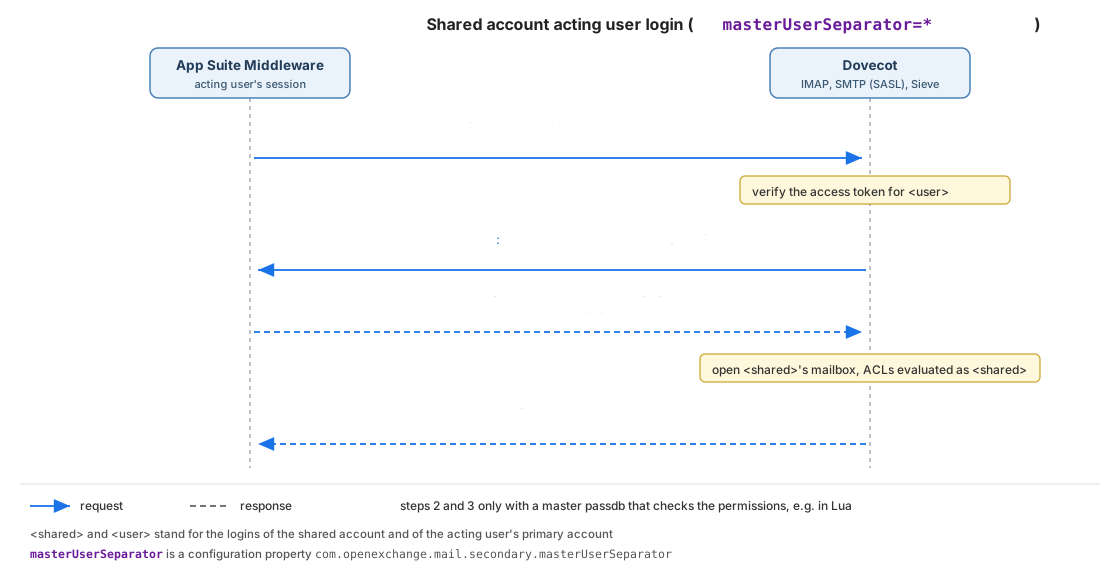
Dovecot logs a successful login as Master user logging in as <shared account>.
Migration
With the introduction of Shared Accounts, collaborative access to mail- and calendar-related functionality of the same account by multiple users becomes possible. In the past, these use cases were covered to a certain extent by similar concepts - Secondary Mail Accounts (mail access only) and Deputy Permissions (mail- and calendar folder shares). Both can be upgraded to Shared Accounts manually as outlined below.
Upgrade from Secondary Mail Accounts
Secondary Accounts refer to email accounts that are assigned to users next to their personal, primary mail account. They often serve a similar purpose as Shared Accounts, but technically, they are only additional mail- and transport account assigned to one or more users. See Secondary Mail Accounts for further information.
So, since only mail account configuration data is stored in App Suite middleware for secondary mail accounts, they can easily be migrated manually by registering a new shared account for each of the secondary account email addresses that should be used, using the same mail server configuration data that was used for previous secondary account, then grant shared account permissions to all users and groups that should have access to them. Afterwards, the redundant secondary accounts are no longer needed and can be de-registered again.
Upgrade from Deputy Permissions
A deputy has configurable access to granting user's primary mail account's Inbox and/or standard Calendar folder. Moreover, a deputy might get the "send on behalf of" permission granted, which allows him to send E-Mails on behalf of the granting user.
So, App Suite middleware supports to migrate a granting user to a Shared Account using the SOAP API for Shared Accounts.
Note: The element password is in most cases optional, but must be set in case the com.openexchange.mail.secondary.passwordSource is set to user. See the chapter Password Source for more information.
Note: The conversion process changes the entity type of the user to a Shared Account. As Shared account access is controlled by Shared Account Permissions, the deputy permissions granted by the converted user account are automatically revoked. The Shared Account permissions need to be set up using the SOAP provisioning API, that's not part of the migration process.
The following example shows a SOAP request to convert the user with the id 6 to a shared account in context 1.
<soapenv:Envelope xmlns:soapenv="http://schemas.xmlsoap.org/soap/envelope/" xmlns:soap="http://soap.admin.openexchange.com" xmlns:xsd="http://dataobjects.soap.admin.openexchange.com/xsd" xmlns:xsd1="http://dataobjects.rmi.admin.openexchange.com/xsd">
   <soapenv:Header/>
   <soapenv:Body>
      <soap:convertUserToSharedAccount>
         <soap:ctx>
            <xsd:id>1</xsd:id>
         </soap:ctx>
         <soap:user>
            <xsd:id>6</xsd:id>
         </soap:user>
         <soap:password>userpassword</soap:password>
         <soap:auth>
            <xsd1:login>admin</xsd1:login>
            <xsd1:password>adminpassword</xsd1:password>
         </soap:auth>
      </soap:convertUserToSharedAccount>
   </soapenv:Body>
</soapenv:Envelope>
Restrictions and Limitations to upgrade a User Account to a Shared Account
As Shared Accounts do have limitations see chapter Restrictions and Limitations for detailed information. There are restrictions enabled that prevent you to upgrade specific user accounts. See the list below about the restrictions to upgrade user accounts.
- You cannot upgrade the context administrator to a shared account.
- You cannot upgrade guest users to a shared account.
- As Shared Accounts cannot be part of a group the upgrade process removes all group memberships but the default group.
- The Shared Account is downgraded regarding the user module access as Shared Accounts only support the mail and calendar module. This mean that all accesses granted via permissions are removed after the conversion. E.g. files and folders in the infostore which are not public, tasks and others resources won't be accessible.
- As part of the conversion, all deputy permissions of the user account are revoked. For mail, deputy permissions are backed by ACLs on a mail server (e.g. Dovecot), which are removed via the deputy permission service. Since this service does not support transactions, the conversion cannot be performed atomically: if the conversion fails midway, the implementation attempts a best-effort rollback by re-applying the previously removed deputy permissions through the same service, but there is no guarantee that this rollback succeeds or restores a fully consistent state. Therefore, if the conversion reports an error, the caller must verify the deputy permissions and, if necessary, restore them manually.
The converted user account has the same restrictions and limitations described in the next chapter.
Restrictions and Limitations
In many aspects, Shared Accounts behave just like additional mail- and calendar accounts within App Suite that are used collaboratively, with all the known functionality. However, there are a few restrictions and limitations:
- Only the mail and calendar module is available in Shared Accounts - no access to other modules of the shared account (tasks, contacts, files) is possible.
- It is not possible to directly log into a Shared Account in App Suite. The internal user account is disabled for login explicitly (
mailenabledflag isfalse), and its data is solely accessible through other user session's with corresponding access rights. - No re-sharing of data in Shared Accounts is possible, i.e. it is not possible to set further ACLs on IMAP folders of Shared Accounts, or change the permissions of folders in shared accounts through App Suite. Similarly, shared account entities cannot receive any further shares from other users, or cannot receive deputy rights for other users.
- Shared account entities must not be added as member to groups.
- Shared Account entities cannot be assigned the administrator role for managed resource.
- Drive mail, i.e. sending mails with auto-managed links to attachments, cannot be used with Shared Accounts.
- No push notifications for the web client are triggered for changes in integrated Shared Accounts.
- The Shared Account's mailbox on the IMAP server is accessed via impersonation, so all users share the same set of flags assigned to mail messages.
- Scheduling emails for delayed transport, or snoozing emails for re-appearance are not supported in Shared Accounts.
- Encryption and signing emails sent from Shared Accounts via OX Guard is not supported.
- Calendars from Shared Accounts are not exposed via CalDAV.