
Mail Push deprecated
Enable permanent mail push listeners
The existing mail push framework of the Open-Xchange Middleware has been extended by the capability to spawn "permanent" listeners for incoming new message deliveries. Up to that point the life cycle for a listener was bound to at least one active session, which is associated with a client that is allowed to receive mail push notifications.
With introduction of the previously mentioned capability, listeners can be started without the need for an existent session right on the start of an Open-Xchange Middleware node.
Where permanent listeners run
Permanent listeners that hold resources on a node - the IMAP connection of open-xchange-push-imapidle, the listener of open-xchange-push-mailnotify - are spread over all nodes with com.openexchange.push.allowPermanentPush=true that run the package. Each registered user belongs to one of these nodes, determined by rendezvous hashing over the nodes that are alive. Nodes announce themselves through the cluster membership in Redis every 5 seconds; the placement reads the members every 2 seconds and no longer counts one that was silent for 30 seconds. When a node joins, it takes over its share of the users from all others; when it leaves, only its own users move. Since 8.55 there is no master node any more that starts all listeners on itself.
A listener only runs while its node holds a lease for the user in Redis, renewed every 30 seconds and valid for 90 seconds. The new owner starts a listener only once it holds the lease, and the former owner releases the lease only after it stopped its listener. With Lua scripting in Redis (the default) taking and releasing a lease are atomic, so no two nodes hold the lease of a user at once; without Lua they are best effort. A node cut off from Redis keeps its listeners until it stops them as described below, so while others reach Redis a user may be served twice for a short while; IMAP IDLE additionally guards each mailbox by a lock of its own; a node holding the lease takes over the lock another node's permanent listener left behind, but never the one of a listener for a session. Consequences:
- Users move on request. A node that owns users another node still runs asks for them, no more per second than it starts, and the other node stops each listener asked for and releases its lease at once. Until then the former owner keeps the listener running, so a moving user goes without push for a few seconds only. A user nobody asks for is stopped after 60 seconds, or later as long as users of the same push manager are still asked for, at most after an hour.
- Moving takes as long as the node starting the users needs: the number of their listeners - one per user and push manager, e.g. IMAP IDLE and mail notify - divided by
com.openexchange.push.permanent.maxStartsPerSecond. A node joining N others takes over about 1/(N+1) of all users; with 100,000 users on 20 nodes a 21st one starts about 4,800, which takes 8 minutes at 10 per second. A node that stops orderly releases its users at once and each other node starts its part of them, so with 5,000 users and 20 remaining nodes they run again after about 25 seconds. - The users of a killed node start on the others once its leases expired, after 90 seconds at most. So do the users of a node that could not renew its leases, e.g. during a Redis outage, once Redis is back.
- A node that could not renew its leases for 60 seconds, e.g. as it cannot reach Redis, stops its listeners, 30 seconds before the leases may expire and others may take over. Since leases are renewed every 30 seconds, an outage shorter than 30 seconds stops nothing; after one, a node announces itself and takes its leases again within 2 seconds. Should Redis lose its data, e.g. when restarted without persistence, the nodes announce themselves anew and wait 20 seconds for each other before they move any user.
- Listeners start and stop at
com.openexchange.push.permanent.maxStartsPerSecondper node, 10 by default, so that a node coming or going does not lead to thousands of logins at the mail server at once. Raising it shortens moving users; when a node leaves, the mail server sees up to that many logins per second from each other node. A start that runs no listener - e.g. push is disabled for the user, or no credential is kept - is tried again every minute for 11 minutes - long enough for the IMAP IDLE lock of a listener for a session to expire -, then with doubling delays up to 30 minutes, and right away once the user registers again, its former node stopped its listener, or a push property is reloaded. - A registration on any node starts the listener on the owning node within about two seconds; an unregistration stops it there. The node receiving it tells the others along with whether the user is registered now, and the owning node checks that against the database master, so a lagging replica delays nothing. A user deleted along with its registrations is told once the deletion is committed.
A pod of a StatefulSet keeps its name across restarts; the chart sets POD_NAME_STABLE=true for it, so that a restarted pod gets the same users back. A pod restarted before its former JVM was dropped from the cluster membership waits for that, up to 30 seconds; only if another running JVM keeps announcing the name, it uses a random identifier after 35 seconds. Other pods use a random identifier per start.
Push via Dovecot's HTTP notifications holds no resources on a node and is not placed: its registration at Dovecot is made by the node receiving the registration.
During a rolling upgrade from a version before 8.55, the new nodes start listeners where they are registered, like the former non-master nodes, as long as a node of the former version runs the master. Once none does any more, the new nodes take over within a minute.
Run the update tasks right after an upgrade that brings new ones, e.g. with runallupdate or the update job of the Helm chart (update.enabled, see Running on Kubernetes). Until a schema is updated, no permanent listener starts for its users: each start is refused with "Database schema is locked or needs update" and tried again like any start that ran no listener, and nothing but a login to one of its contexts or an explicit run triggers the update. Once the update tasks ran, the listeners start right away.
To prepare a certain Open-Xchange Middleware node to spawn permanent mail push listeners the following properties need to be configured in file /opt/open-xchange/etc/mail-push.properties:
com.openexchange.push.allowPermanentPushThis is the general switch to enable/disable support for permanent listeners on a node. Thus needs to be set to "true"com.openexchange.push.allowedClientsSpecify the comma-separated list of clients which are allowed to receive notifications about new mails.com.openexchange.push.credstorage.enabledAs permanent listeners are required to run without an active session, the credential storage can be used to store user credentials in installations that do not support a master authentication to the mail storage. Hence, if the propertycom.openexchange.mail.passwordSource(/opt/open-xchange/etc/mail.properties) is not set to "global" this property is required to be set to "true"com.openexchange.push.credstorage.passcryptThis property is required ifcom.openexchange.push.credstorage.enabledis set to "true". It does specify the passphrase to use to symmetrically encrypt the stored credentials. The passphrase is required to be equal on each cluster member.com.openexchange.push.credstorage.rdbSuperseded since 8.54: once the credential storage is enabled, the credential is kept by the mail credential vault (tablemail_credential, encrypted withcom.openexchange.sessiond.encryptionKey), the way snoozed mail, scheduled mail and the GDPR mail export keep theirs - persisted in the database, whatever this property says. The property only decides where rows of the former storage still live until the migration has moved them; withfalse(the default) they live in cluster memory, are never migrated and go with the next login of the user. Before 8.54 it offered two ways of storing the user-associated login/password combination: in cluster memory (default) or persisted to database. While the first way ensures that no user credentials are persisted anywhere in the Open-Xchange installation, it has the big disadvantage that stored credentials are gone once the last cluster member gets shut-down. Therefore there is also the possibility to store the credentials inside the database. Of course, no matter where the credentials are stored, they are encrypted using the value fromcom.openexchange.push.credstorage.passcryptproperty
With setting the properties above the configuration on the Open-Xchange Middleware node is prepared to spawn permanent listeners for new mails.
A permanent registration made for a push subscription - e.g. of an app of the Mobile API - is removed with the last subscription of its client for new mail. Before 8.54 that removal was refused, so such registrations stayed, their listeners kept being started and their credentials kept. Since 8.54 one node a day, starting an hour after it came up, removes the registrations of clients that are not in com.openexchange.push.allowedClients and have no push subscription for new mail any more. Where that cannot be told - the subscriptions cannot be read, or the push notification service is not running - the registration stays. The log says Removed N permanent push registration(s) nothing wants any more; with the last registration of a user its listener stops and the kept credential goes.
Now an appropriate mail push bundle/package needs to be enabled that supports spawning permanent listeners. Currently Open-Xchange ships with three implementations:
open-xchange-push-dovecot(also requires the optional open-xchange-rest package)open-xchange-push-imapidle(Not recommended, therefore disabled for permanent listeners by default:com.openexchange.push.imapidle.supportsPermanentListenersis set to "false" by default)open-xchange-push-mailnotify
This article is focussed on open-xchange-push-dovecot. Packages can be enabled in your chart's values.yaml:
core-mw:
  packages:
    status:
      open-xchange-push-dovecot: enabled
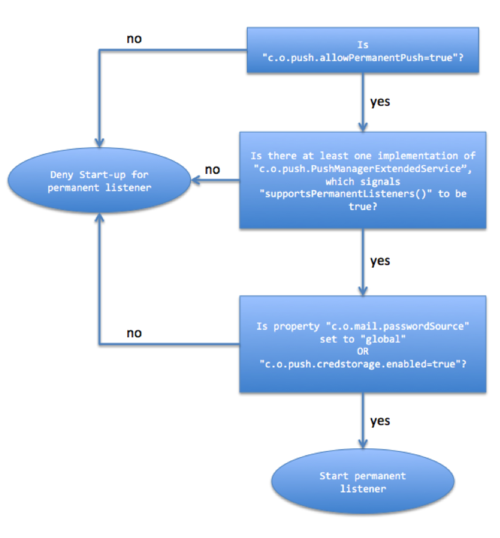
Putting all together the following execution flow is taken to decide whether permanent listeners are spawned or not:
To check at any time what listeners are currently running, there is a new command-line tool /opt/open-xchange/sbin/pushusers that outputs the user-id/context-id pair along-side with the information if the listener is of permanent nature or bound to an active session:
usage: pushusers [-l | [ -r -c <contextId> -u <userId> -i <client>] ] -A <masterAdmin> -P <masterAdminPassword> [-p
                 <RMI-Port>] [-s <RMI-Server>] [--responsetimeout <responseTimeout>] | [-h]
 -A,--adminuser <adminUser>       Admin username
 -c,--context <contextId>         A valid context identifier
 -h,--help                        Prints this help text
 -i,--client <clientId>           The client identifier
 -l,--list-client-registrations   Flag to list client registrations
 -p,--port <rmiPort>              The optional RMI port (default:1099)
 -P,--adminpass <adminPassword>   Admin password
 -r,--unregister                  Flag to unregister a push user
    --responsetimeout <timeout>   The optional response timeout in seconds when reading data from server (default: 0s;
                                  infinite)
 -s,--server <rmiHost>            The optional RMI server (default: localhost)
 -u,--user <userId>               A valid user identifier

Command-line tool for unregistering and listing push users and client registrations
An exemplary out put might look like:
~# /opt/open-xchange/sbin/pushusers --list -A oxadmin -P secret
Context  User  Permanent
      1  249   true
      1  402   true
Mail notify and unicast notifications
The mail server sends the notifications of open-xchange-push-mailnotify via UDP. Without multicast (com.openexchange.push.mail.notify.udp_listen_multicast=false) they reach one node only, e.g. the one a Kubernetes service picks, while the listener of the user may run on another one. A node receiving a notification for a mailbox it holds no listener for forwards it via Redis Pub/Sub to the other nodes, collected for one second, at most 10,000 mailboxes at a time; the metric appsuite_push_mailnotify_forward_dropped_total counts the ones dropped beyond. The node holding the permanent listener fires it; a node holding only a listener for a session of the user does not, as it may have received the notification itself. A forwarded notification is never forwarded again. With multicast every node receives each notification itself and nothing is forwarded.
Setup Dovecot Mail Push
Please see here
Setup Push Notification Service
Please see here.